readbud - get paid to read and rate articles

Jumat, 20 Januari 2012

recommended apps

3D Gallery


Download
Gallery 3D


Airplane AutoSwitch


Download
Airplane AutoSwitch
pass: ajie1987


Chinese Keyboard


Download
Chinese Keyboard
pass: ajie1987


KAMUS

Feature :
- Translate English - Indonesia | Indonesia - English
- Kamus Besar Bahasa Indonesia (KBBI)

Download
Kamus


Music Player Walkman


Download
Music Player Walkman


ezPDF Reader


What's in this version:
1.3.4.0
New Toolbar for Voice Reading. Several functions to control reading state are supported
You can also register words that will be skipped on Voice Reading per PDF file
Link about external other PDF file is supported
Improved Rendering Process
Some Bugfix

Download
ezPDF Reader


Google+ 1.05 (Google Plus) Modded Black
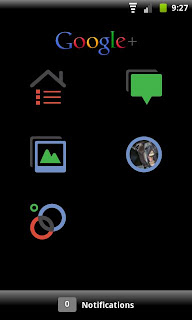
Recent changes:
Improved notifications reliability
"_add to circle" notifications shown in bulk
Share stream posts to individual people
Clicking a +mention takes you to the person’s profile
+mentions now autofill from your Circles
Stream no longer resets to top when screen is rotated
Nearby accuracy
Start a 1:1 huddle from a person’s profile or a group huddle from a circle profile
Hide 1:1 huddles
Clickable links in huddles
Improved autocomplete when adding a person to a huddle

Download
Google+ Mod Black


Launcher for android

Active Launcher

Info : 
Work On Eclair
Work On Rom Froyo
Work On Rom GingerBread
Bug : FC, Ketika Add Folder

Arc Launcher With & Without Dock


Download

Download


ADW iPhone MIUI Launcher

Download


Gingerbread Launcher

Download


HoneyComb Launcher BETA

Download


MxHome Launcher

Download


MyHome launcher

Download


Regina 3D Launcher

Download


Launcher 7

Download


Sweeter Home

Download


Tutorial install cm7 Rc-3.0 + link


changelog:
- new build (new feature like: can change network preferences, minimal ring lockscreen, etc)
- include all fix
- removed a2sd (better use s2e than a2sd)
- removed gapps
- removed no-frills (use cm-setting to change cpu min max & governor)
- smoother
- better ram management (kernel patch)
- fix cm-setting for change min & max cpu frequency (kernel patch)
- revert backlight. sometime led cant off after set brightness. restart to make it normal again
- and more

how to install:
- download px-cwm-v2.zip (special thx to ZimniY) here: [download]
- flash it from recovery or cwm recovery
- reboot to cwm recovery again

- Download flash px-cm7-RC-3.0.zip here:[download]
- flash px-cm7-RC-3.0.zip cwm recovery
- reboot your phone
- its not recomennded to use live walpaper, u should use static walpaper. since live walpaper will make your device hot & drain more battery

note: this version is not coming with google apps, u should download & install it manually
you can download it from here: link

note: this version is not coming with preinstalled a2sd DarkTremor
better to use s2e a.k.a simple 2 ext
download it from market!

how to configured s2e:
- first, downlaod & install it from market
- open s2e, and press menu and choose setting
- checklist the advance mode, extended partitions info, mount as ext4
- u also can set read buffer. i'm using 3Mb
- press back, and press menu -> reboot
- if your phone not automatic reboot, u should reboot it manually
- after reboot, open s2e again. u can check whatever u want
- i'm check it all, except Application data (Application data = a2sd extream datasd)
- reboot again
- u need to modified 02gio. see this post link

have problem cant checklist application, dalvik-cache, private-apps application-data on s2e even u've checked mount as ext4 and reboot?

if you got problem with active s2e or cant installed app (always auto reboot after install app)
you should reformat your 2nd partition as ext4 from PC
because sometime cwm recovery cant format propely the 2nd partition sdcard

you must format your second partition using computer as ext4
u can use gparted (linux) or minitool partition wizard (windows)


Rabu, 18 Januari 2012

CyanogenMod 9 for samsung galaxy gio


here's some report from me

Tested & Working:
RIL
proximity
touchscreen with multi touch (but it'll give alot of warning on logcat. trying to disable them)
gps
compass (please test)
accelerometer for autorotate
4 pin headset + button (like from samsung)
microphone
root & busybox
call & sms
packet data with 2G(GPRS/EDGE) & 3G (UMTS/HSDPA)
wifi
bluetooth
USB mass storage
wired & hotspot tether *

* wired & hotspot tether use 3rd application. u can download from this post's attachment

Not Working:
3 pin headset (must have ICS source to fix it)
hardware acceleration (our gpu libraries from gingerbread is not 100% working on ICS. and qualcomm isnt release libraries for ICS yet)
camera (problem with HAL)
FM Radio
BLN (liblight from gingerbread is not working. need to recompile liblight with some modification for BLN. the problem is i dont have ICS source)
find bug? just report it

PATCH FOR CYANOGENMOD 9

I'M NOT RESPONSIBLE FOR ANY DAMAGE TO YOUR PHONE BECAUSE FLASHING IT


NOTE: Start from patch-cm9-v3. i'm not provide move some system app to user app because it make patch size 14mb bigger.
if you fresh installed this rom (not yet applied patch) and want to free some space on /system partition then you need to install patch-cm9-v2 first and then install the latest patch

patch-cm9-v3
[Download] 
Changelog:
disable setupwizard. because cause problem in some user
trying to patch surfaceflinger to decrease lag. but still failed
update egl libraries
fix error while charging in off condition. now u can charging when phone turn off
fix frame buffer issue on kernel, now we have more color & better color depth.
fix swap, now really working on my device

patch-cm9-v2
[Download]
Changelog:
added genlock feature to kernel
added zram (compcache) to kernel
patch video decoder driver
change all module on /system/lib/modules to work with our kernel version
added support to swap
added bugfix on S2E *not sure S2E work or not on this ROM*
change density to 150 for better view & match keyboard
fix autorotate sensor
fix sensors *please test*
change bootanimation
update usbstorage app, thx to bexton
enable setupwizard
move some system application to user application to give more freespace on /system (youtube,maps & videoEditor)
let me know, if you found bug because moving these to user applicaton.
Dont forget to mount /system & /data from cwm before flash it
after flash it, please open root explorer & go to /system/etc/init.d/02gio and change permission to rwxr-x---. sorry i forgot to change it

patch-cm9-v1
[Download]
Changelog:
fix touchscreen
fix flickering
add netfilter support for native data usage report
add IPV6 support

Senin, 16 Januari 2012

Google Music 4.1.511


Requirements: Android 2.2 and up 

Overview: Shop music on Android Market and listen instantly using the Google Music app.

Google Music is a cloud-powered music player and storage service that lets you keep your music collection online so you can save space on your Android device.

* All your your music purchases from Android Market automatically appear on Google Music.
* Add up to 20,000 more songs from your personal music collection on your computer for free.
* Access to your entire music library instantly with the Google Music app, and save your favorites for offline playback.
* Share a free full play of the songs you purchased from Android Market with your friends on Google+.
* Learn more about Google Music at music.google.com/about
* Available in the U.S. only. Of course, using proxies, available worldwide (ie Market enabler: free app in Market).


More Info:
Market access : HERE 
Download: Hereafter attached

I am getting FC ?: first WIPE DATA of the old Google Music app, then uninstall and install the new Music 4.0.9

For full Fun use


1- install Market 3.3.11: HERE
2- click on HERE with your device and choose Market as the application to open, browse the content a couple of minutes, reboot you should get the Music section to appear in your Market after reboot  
3- and if you have a Windows computer Install Google Music Manager in you Computer. File attached below 
4- usefull comments/article: HERE

Enjoy and comment back how it works for you ! 


games for Galaxy Tab 7+

Roll In The Hole
link : apk

Marble Blast
link: apk

Bugs Village
link: apk

Destroy Gunners SP
link: apk

Great Little War Game
link: apk

Wheres my water
link: apk

Extreme Formula

link: apk

PIN BALL HD

link: apk

Shine Runner

link: apk

Magic Defenders

link: apk

Minggu, 15 Januari 2012

Flashing ROM Honey Comb 3.2 Galaxy TAB 7 Plus (P6200)


WARNING!


The methods and procedures discussed here are considered at risk and that you should not try it unless you really understand. If there is damage to your equipment, we will not be responsible, you alone are responsible, and you are reminded!

Download terlebih dahulu file berikut ini :
1. Stock Firmware INDONESIA – GT-P6200MAAXSE
16th November 2011 – P6200XXKK6/P6200OLBKJ1/P6200XXKK6/P6200XXKK6
Direct download link ─ klik di sini

2. Odin3 v1.85
Direct download link ─ klik di sini

3. Drivers
Install Samsung KIES untuk mendapatkan driver yang tepat untuk PC/Laptop anda.
Download Kies ─ klik disini

Panduan Instalasi :
1. Install Kies untuk mendapatkan driver yang tepat
2. Ekstrak Odin3 v1.85.zip dan jalankan file Odin.exe
3. Matikan Galaxy Tab, kemudian masuk ke Download Mode (tekan Vol.Down + Power bersamaan selama beberapa saat) 
4. Koneksikan Galaxy Tab ke PC/Laptop dengan kabel USB
5. Kalau sudah terkoneksi, Odin akan menunjukkan pesan "Added" di bagian kiri bawah layar program Odin. Kalau tidak ada berarti terkoneksi.
6. Ekstrak firmware yang sudah di download.
7. Pada window Odin, klik tombol PDA dan pilih file hasil ekstraksi firmware dalam bentuk .tar
8. Klik tombol Start dan tunggu hingga proses selesai
9. Galaxy Tab anda akan reboot secara otomatis, dan anda sudah berhasil mem-flashing Galaxy Tab 7 Plus anda ke Android Honeycomb 3.2